
TP-Link RE505X WiFi 6 Extender Review: AX1500 Performance, Features & Alternatives
As an Amazon Associate, I earn from qualifying purchases. Some links may earn us a commission at no extra cost to you.
Weak WiFi in an upstairs bedroom, home office, basement, or other distant room does not always mean you need to replace your entire network. A well-placed range extender can provide a simpler way to improve coverage in one or two problem areas.
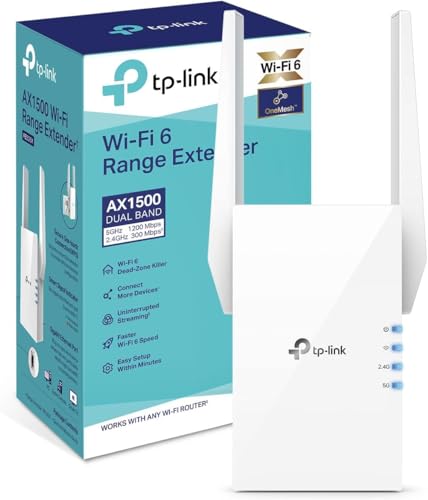
The TP-Link RE505X is an AX1500 dual-band WiFi 6 extender with a Gigabit Ethernet port, Access Point mode, two external antennas, and compatibility with TP-Link OneMesh. It is aimed at homes that already have a working router but need stronger wireless coverage farther away.
Key Features & Benefits
AX1500 Dual-Band WiFi 6
The RE505X uses dual-band WiFi 6 with combined wireless speeds of up to 1500 Mbps.
WiFi 6 support makes it a better fit for newer phones, laptops, streaming devices, and other compatible equipment than older WiFi 5 or single-band extenders.
The actual connection speed you receive still depends on the router, distance, interference, building materials, client devices, and where the extender is installed.
Gigabit Ethernet Port
A Gigabit Ethernet port adds flexibility for equipment that benefits from a wired connection.
A desktop PC, television, game console, or other Ethernet-equipped device can connect directly to the RE505X rather than relying entirely on its own wireless connection.
The port also makes the extender more versatile than basic wireless-only repeaters.
TP-Link OneMesh Compatibility
The RE505X supports TP-Link OneMesh with compatible TP-Link networking equipment.
This can create a more unified network experience than operating an extender completely independently from the main router.
Compatibility depends on the other TP-Link equipment in the network, so check your router before buying specifically for OneMesh functionality.
Straightforward Expansion Without Replacing the Router
One of the main reasons to consider the RE505X is that it does not require replacing an otherwise functional router.
For a home with one or two difficult rooms, adding an extender can be considerably simpler than rebuilding the network around a multi-node mesh system.
Pros & Cons
Pros
- Dual-band WiFi 6
- AX1500 speed class
- Gigabit Ethernet port
- Access Point mode
- Two external antennas
- TP-Link OneMesh compatibility
Cons
- Slower than AX3000-class WiFi 6 extenders
- Performance depends heavily on placement and the router signal it receives
Who Should Consider the TP-Link RE505X?
The RE505X suits homes where WiFi already works well near the router but becomes unreliable in a particular bedroom, office, entertainment area, or other distant section of the house.
It also makes sense when you want WiFi 6 support without moving immediately to a complete mesh system.
The Gigabit Ethernet port adds value for users who have a wired device in the problem area, while Access Point mode provides another installation option when Ethernet cabling is already available.
Alternatives
HAOYOUBI AX3000 WiFi 6 Extender — Faster Indoor WiFi 6 Option
The HAOYOUBI is an AX3000 dual-band WiFi 6 extender intended for users who want more wireless headroom than the AX1500 RE505X.
Its listing includes support for both 5.8GHz and 2.4GHz bands, an Ethernet port, and connectivity for a large number of devices.

Why consider it: The AX3000 speed class provides a higher theoretical wireless ceiling than the RE505X.
Pros
- AX3000 WiFi 6
- Dual-band operation
- Ethernet port
- Designed for multi-device networks
Cons
- Manufacturer coverage figures should be treated as ideal-condition estimates
- Less established networking brand than TP-Link
Trade-offs / Who should skip: The RE505X may be preferable if you value the TP-Link ecosystem and OneMesh compatibility more than the higher advertised speed class.
NETGEAR EX6120 — Established Compact WiFi 5 Extender
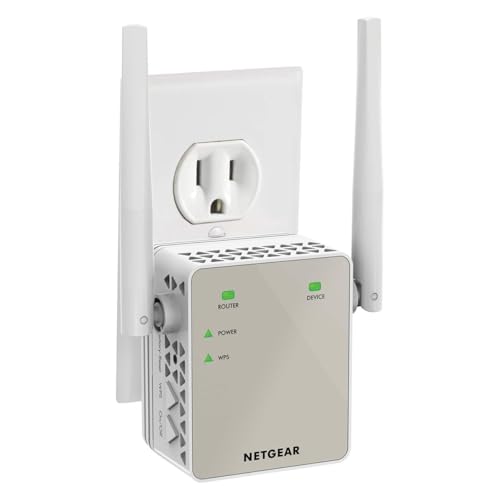
The NETGEAR EX6120 is a compact AC1200 WiFi 5 extender rated for up to 1.2 Gbps.
It works with existing routers and is designed to extend coverage for up to 25 devices. Its long review history also makes it one of the more established products among the alternatives considered here.

Why consider it: It provides a straightforward extender from a well-known networking brand with extensive owner feedback.
Pros
- Dual-band AC1200 connection
- Compact design
- Works with existing routers
- Large owner-review history
Cons
- Uses WiFi 5 rather than WiFi 6
- Lower wireless capability than newer AX models
Trade-offs / Who should skip: Choose the RE505X or another WiFi 6 model if newer wireless standards are important for your network.
INEAUTO AX1800 Outdoor WiFi 6 Extender — Outdoor Coverage Option
The INEAUTO is designed for situations the RE505X is not built to address: outdoor WiFi coverage.
It combines AX1800 WiFi 6 with an IP67 weatherproof enclosure and PoE support. Its intended uses include patios, yards, RV areas, camping setups, and Starlink installations.

Why consider it: It extends WiFi 6 coverage into outdoor environments where a normal indoor wall-plug extender would not be appropriate.
Pros
- AX1800 WiFi 6
- IP67 weatherproof construction
- PoE support
- Intended for outdoor coverage
Cons
- More involved installation than an indoor wall-plug extender
- Unnecessary for ordinary indoor dead zones
Trade-offs / Who should skip: The RE505X is the simpler choice if your coverage problem is entirely indoors.
TP-Link RE505X vs. the Alternatives
The TP-Link RE505X is the balanced indoor option, combining WiFi 6, Gigabit Ethernet, Access Point mode, and OneMesh compatibility.
The HAOYOUBI AX3000 raises the advertised speed class for buyers who want greater theoretical wireless capacity.
The NETGEAR EX6120 is an older WiFi 5 option but benefits from a compact design and a much longer owner-review history.
The INEAUTO AX1800 fills a completely different role by bringing WiFi 6 coverage to outdoor spaces with a weatherproof PoE design.
Common Questions
Is the TP-Link RE505X WiFi 6?
Yes. The RE505X is a dual-band AX1500 WiFi 6 range extender.
Does the RE505X have an Ethernet port?
Yes. It includes a Gigabit Ethernet port for compatible wired devices.
Can the RE505X operate as an access point?
Yes. Access Point mode allows it to create WiFi from an existing wired Ethernet connection.
Does it support TP-Link OneMesh?
Yes, the RE505X supports OneMesh when paired with compatible TP-Link equipment.
Does a WiFi extender increase my internet plan’s speed?
No. An extender cannot make the internet connection entering your home faster. Its purpose is to improve wireless coverage in locations where the router signal is weak.
Where should the RE505X be installed?
Position it where it can still receive a reliable signal from your router while being closer to the area where coverage needs improvement.
Placing an extender at the very edge of the router’s usable range can limit performance.
Verdict
The TP-Link RE505X offers a straightforward way to add WiFi 6 coverage to a home without replacing the existing router.
Its AX1500 dual-band connection, Gigabit Ethernet port, Access Point mode, two external antennas, and OneMesh compatibility cover the features most users need from an indoor range extender.
It is not the fastest option in this comparison. HAOYOUBI moves up to AX3000, while the INEAUTO model is better suited to outdoor installations. NETGEAR’s EX6120 provides a simpler established alternative for users who do not need WiFi 6.
For a home with one or two indoor dead zones and an existing TP-Link-compatible network, the RE505X provides a practical middle ground between a basic repeater and replacing the network with a full mesh system.
As an Amazon Associate, I earn from qualifying purchases.