
Best Small Business Printers (laser & ink tank)
This post contains affiliate links. As an Amazon Associate, I earn from qualifying purchases.
How I researched
-
I compared hands-on lab tests and long-term reviews, then verified hard specs (print speed, paper capacity, ADF type, connectivity, security) against manufacturer datasheets. I also scanned retail feedback for reliability patterns and setup quirks.
Top picks
1. Brother MFC-L8905CDW — Best for most small offices (color laser AIO)
For teams that need one dependable hub for printing, copying, and scanning, this checks the boxes: fast text output, a true duplex ADF that scans both sides in one pass, robust security options, and expandable paper capacity (up to ~1,300 sheets with extra trays). It’s a strong “do-everything” color machine without enterprise complexity.
No products found.
Pros
-
Quick, sharp text and clean color charts
-
Single-pass duplex scanning saves serious time
-
Large, intuitive touchscreen with customizable shortcuts
-
Expandable paper capacity to grow with your team
Cons
-
Big and heavy—measure your credenza first
-
Color toner costs add up if you print lots of graphics
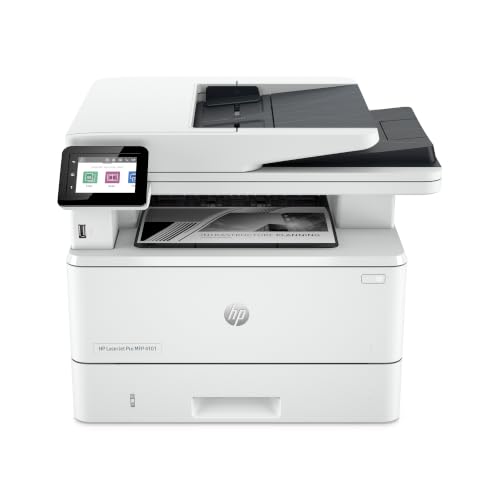
2. HP LaserJet Pro MFP 4101fdw — Best for text-heavy teams & security (mono laser AIO)
If you mostly print invoices, letters, and forms, this mono laser is a fast, low-friction choice. It pumps out pages quickly, includes a single-pass duplex ADF, and comes with sensible, built-in security and fleet-friendly management tools.

Pros
-
Very fast black-and-white printing for busy queues
-
Strong security features and admin controls
-
Reliable duplex scanning and easy wireless/Ethernet setup
Cons
-
No color printing
-
Uses chipped cartridges (locked to compatible supplies)
3. Canon MAXIFY GX7020 — Best for lowest running costs (color ink tank AIO)
This refillable ink-tank AIO is built for small offices that print color frequently. Bottled ink keeps the cost-per-page extremely low, while a 600-sheet paper capacity and duplex ADF help it keep up with real workloads. It’s not as fast as a laser, but it’s far cheaper to run for mixed color docs.

Pros
-
Ultra-low cost-per-page; long intervals between refills
-
Big 600-sheet capacity for fewer reloads
-
Duplex ADF scanning and business-grade build
Cons
-
Slower print speeds than comparable lasers
-
Color accuracy is good for office docs, not photo-studio work
4. Canon Color imageCLASS MF656Cdw — Best budget color laser AIO
A sharp, affordable entry into color laser. It produces excellent text, solid business graphics, and offers duplex ADF scanning and an approachable interface—great for reception/front-office use.

Pros
-
Crisp text; dependable everyday color
-
Two-sided (duplex) scanning and printing
-
Competitive running costs for its class
Cons
-
Graphics/photo quality is fine, not marketing-grade
-
Startup can be a bit noisy
5. Brother HL-L6415DW — Best high-volume mono (print-only) workhorse
When you just need piles of clean black-and-white pages, this print-only laser is a tank. It’s fast, supports high-yield toner for lower running costs, and has the security/management features you want for a shared office printer.

Pros
-
Blazing print speeds for heavy queues
-
High-yield toner options lower cost-per-page
-
Robust security and admin controls
Cons
-
No scanner/copier—strictly print-only
-
Monochrome only; add a color device if needed
Buying guide
-
Laser vs. ink tank: Laser wins on speed and razor-sharp text; ink tanks crush it on color cost-per-page and infrequent refills—excellent for newsletters, brochures, and branded forms.
-
Mono vs. color: If you rarely print color, a mono laser saves both upfront and ongoing. If you do color a lot, choose a color laser for speed or an ink tank for savings.
-
Scanning matters: Look for a duplex ADF; “single-pass” versions scan both sides in one shot and save time.
-
Paper capacity & expandability: A 250-sheet tray is the minimum; teams often grow into 500–1,300-sheet setups (check for optional trays).
-
Security & management: For shared offices, features like PIN/pull printing, encryption, and simple fleet tools reduce headaches and help with compliance.
FAQs
Q: What’s “single-pass duplex scanning” and why should I care?
A: It scans both sides in one pass—roughly twice as fast and less jam-prone than flipping pages. It’s a big time-saver for multi-page forms and contracts.
Q: Are ink tanks messy or unreliable for offices?
A: Modern business ink-tank models are designed for office duty with large paper trays and duplex ADFs. They simply swap cartridges for bottles to cut running costs.
Q: Do I still need Ethernet if I have Wi-Fi?
A: For shared printers, Ethernet is worth it for stability and predictable speeds. All the picks above include Ethernet plus Wi-Fi.
Q: We ship a lot—should we get a separate label printer?
A: Yes. A compact thermal label printer is faster and cheaper for shipping labels than any office printer; keep your office printer for documents.
Q: What about long-term reliability?
A: Follow the recommended monthly duty cycle, keep firmware/drivers updated, and use quality paper and supplies. Business-class lasers and ink-tank AIOs generally hold up well when maintained.
As an Amazon Associate, I earn from qualifying purchases.