
Best Home Wi-Fi Routers
This post contains affiliate links. As an Amazon Associate, I earn from qualifying purchases.
How I researched
-
I compared 2024–2025 lab tests, long-term reviews, and spec sheets to verify ports, Wi-Fi 7/MLO support, coverage claims, and app features.
-
I prioritized reliability signals (years of updates, simple apps, mesh expandability) and called out trade-offs like subscription-gated security suites.
Top picks
1. TP-Link Archer BE9700 — Best for most homes (fast Wi-Fi 7 without the premium)
If you want cutting-edge speed without overspending, this tri-band Wi-Fi 7 router hits the sweet spot: MLO, 320 MHz channels, and generous multi-gig ports (one 10 Gbps plus multiple 2.5 GbE) so you can grow into faster internet and wired backhaul later.


Pros
-
Wi-Fi 7 with MLO for lower latency and higher real-world throughput
-
10 GbE WAN/LAN + multiple 2.5 GbE ports for multi-gig plans
-
EasyMesh support for painless expansion later
-
Strong close- and mid-range performance for a single router
Cons
-
Six fixed antennas = visible hardware
-
Some advanced security features require a paid plan
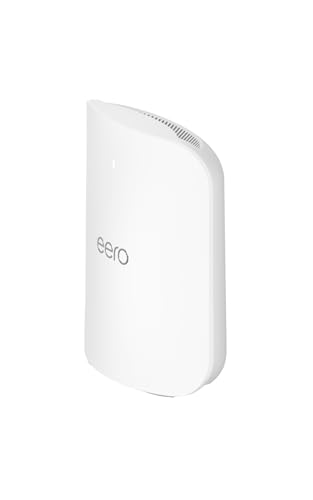
2. eero Max 7 — Best mesh for large homes & easiest setup
For whole-home coverage with minimal fuss, eero’s Wi-Fi 7 mesh is the smoothest to live with. Setup takes minutes, it doubles as a Matter/Thread smart-home hub, and each unit includes multi-gig ports (two 10 GbE + two 2.5 GbE) for fast wired backhaul and NAS/console hookups.
Pros
-
Super-simple app; stable, self-optimizing mesh
-
Built-in smart-home hub features (Matter/Thread/Zigbee)
-
Excellent multi-gig wired/wireless throughput with Wi-Fi 7 clients
Cons
-
Fewer advanced knobs than enthusiast routers
-
Premium pricing and some features behind subscriptions
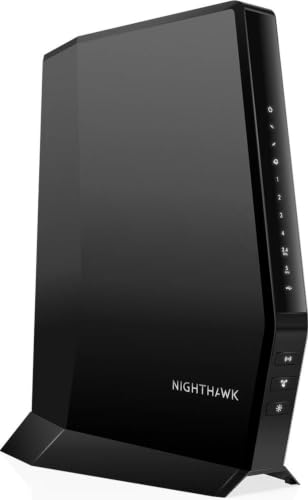
3. NETGEAR Nighthawk RS700S — Best single-router performance
If you’ve got a big one-story space (or central placement) and want the fastest standalone router, the RS700S is a powerhouse: tri-band Wi-Fi 7, 10 Gbps WAN, and wide coverage. It routinely tops performance charts in independent tests.
Pros
-
Top-tier Wi-Fi 7 speeds with strong long-range results
-
10 GbE WAN + multi-gig LAN; ideal for 2–5 Gbps internet
-
Clean UI and solid parental controls; optional security suite
Cons
-
Bulky chassis
-
Like all 6 GHz gear, signal drops faster through walls
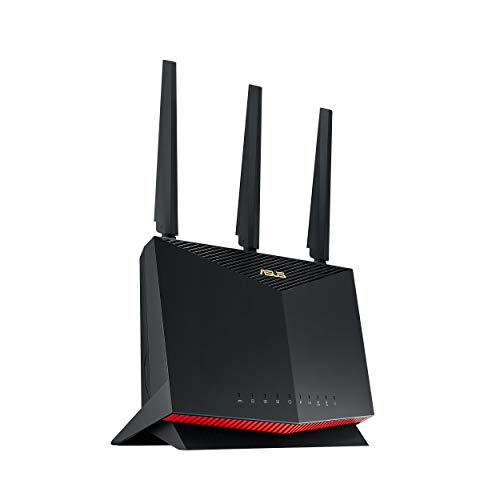
4. ASUS RT-AX86U Pro — Best for gamers & advanced controls (value pick)
A proven Wi-Fi 6 workhorse with 2.5 GbE, Adaptive QoS, and excellent firmware. ASUS gives you granular control (AiMesh, VPN, Game modes) without mandatory subscriptions, making this a great value for power users who don’t need Wi-Fi 7 yet.
Pros
-
Fast, consistent Wi-Fi 6 performance with strong coverage
-
2.5 GbE + robust QoS/parental controls; AiMesh expansion later
-
Gamer-friendly features (Game Port, Mobile Game Mode)
Cons
-
Not Wi-Fi 7—no MLO or 320 MHz channels
-
Larger body with external antennas
5. TP-Link Archer AX55 — Best budget router that “just works”
For small-to-mid-size homes on sub-gigabit plans, the AX55 is the easy recommendation. It delivers stable range and speed for the money and is simple to manage in the TP-Link Tether app.

Pros
-
Strong performance and coverage for a low-cost Wi-Fi 6 router
-
Mature firmware with useful setup options for this tier
-
Works with OneMesh/range extenders if you need a bit more reach
Cons
-
No 6 GHz band; no Wi-Fi 7 features like MLO
-
Best for ≤ gigabit service
Buying guide
-
Single router vs. mesh: If you can place a single router centrally on the main floor, a powerhouse like RS700S or BE9700 may cover you. If you have dead zones or 2+ floors, go mesh (eero Max 7 makes this painless).
-
Your internet speed matters: On 2 Gbps+ plans, look for 10 GbE WAN and at least a couple of 2.5 GbE LAN ports.
-
Devices you own: You’ll only see Wi-Fi 7’s full benefit on Wi-Fi 7 clients. If your phones/laptops are older, a strong Wi-Fi 6 router (RT-AX86U Pro / AX55) is still excellent value now.
-
Understand 6 GHz trade-offs: 6 GHz is fast and uncongested, but it doesn’t punch through walls like 5 GHz. Position nodes carefully—or add another node where you work or stream.
-
Security & parental controls: Many brands include basics free; advanced features can sit behind subscriptions (e.g., NETGEAR Armor, TP-Link HomeShield Pro, eero Plus). Budget for that if you want extras.
FAQs
Q: Is Wi-Fi 7 worth it right now?
A: If you’re on multi-gig internet or buying new Wi-Fi 7 devices, yes—MLO and wider channels improve speed and stability. Otherwise, a great Wi-Fi 6 router will still feel fast and costs less today.
Q: Do I need a 10 Gbps port?
A: Only if your ISP plan or local wired transfers exceed 2.5 Gbps. For future-proofing, a 10 GbE WAN plus a couple of 2.5 GbE LAN ports is ideal.
Q: Will 6 GHz work on my older devices?
A: No—only Wi-Fi 6E/7 clients can use 6 GHz. Older devices will stick to 2.4/5 GHz, which these routers also broadcast.
Q: Mesh vs. adding extenders?
A: Mesh gives you a single network name and seamless roaming; extenders often create a second network and can be fiddly. If you routinely move around the house, mesh is the better experience.
Q: Why does my 6 GHz speed drop through walls?
A: Higher-frequency signals attenuate more through obstacles. That’s normal—plan shorter hops or add another node.
As an Amazon Associate, I earn from qualifying purchases.